HOW TO TRACK A KIDS LOCATION FROM ANYWHERE
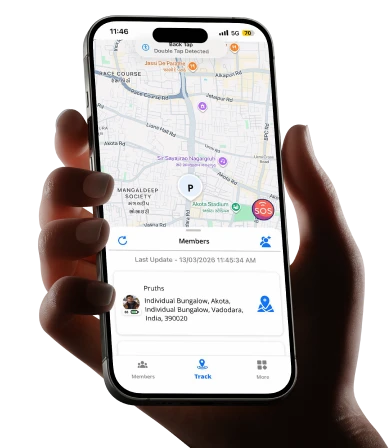
Key Takeaways Real-time GPS tracking gives parents a reliable way to know where their child is without constant phone calls or texts. A geofencing app for kids sends alerts the moment your child enters or leaves places like school, home, or a friend’s house. The right child location app balances safety with respect for your child’s growing sense of independence. Wings Track offers continuous location updates, safe-zone alerts, and battery-friendly tracking built for everyday family use. Honest conversations about tracking build trust, so kids see it as care rather than surveillance. Your daughter said she’d be home by six. It’s now half past, her phone goes straight to voicemail, and you’re standing at the window doing the math on how long it takes to walk from the bus stop. Most parents know that specific knot in the stomach. Learning how to track your kids’ location 24×7 doesn’t remove every worry, but it does replace guessing with a simple, quiet answer on your screen. This guide walks through how continuous location tracking actually works, what features matter, and how to set it up in a way your child accepts rather than resents. What “24×7 tracking” really means Round-the-clock tracking sounds intense, and some parents picture themselves glued to a map all day. In practice it works the other way around. The whole point is that you don’t have to watch anything. The app runs quietly in the background and only speaks up when something is worth your attention. Modern tracking relies mostly on GPS, the same technology your maps app uses, backed up by Wi-Fi and mobile signals to stay accurate indoors or in dense areas. Your child’s phone shares its location on a regular schedule, and you see it on your own device whenever you check. No calling, no waiting for a reply to “where are you?” The value isn’t in staring at a dot. It’s in the peace of mind that the dot is there if you ever need it. Why a geofencing app for kids changes daily routines Geofencing is the feature most parents end up relying on the most, even if they didn’t know they wanted it. You draw an invisible boundary around a place on the map, school, home, grandma’s house, the sports ground, and the app alerts you the moment your child crosses that line. Instead of wondering whether your son made it to school, your phone buzzes with a quiet “Arrived at school” at 8:12. When practice ends and he starts walking home, you know before he’s even texted. A geofencing app for kids turns fuzzy uncertainty into small, timely confirmations that fit around your day. This matters most during the in-between moments: the walk from the bus stop, the time between school ending and you getting home from work, the afternoon spent at a friend’s place you’ve never visited. Consider a family where both parents work until six. Their eleven-year-old lets herself in after school. A simple “Arrived home” alert means neither parent spends the commute wondering if she made it safely inside. Pro Tip: Set up geofences for the three or four places your child visits most, then stop there. Boundaries around every possible location create alert fatigue, and you’ll start ignoring the notifications that actually matter. Choosing the right child location app for your family Not every tracking tool fits every household. A parent of a six-year-old wants something different from a parent negotiating freedom with a fifteen-year-old. Before you commit, it helps to know what separates a solid child location app from one that frustrates everyone within a week. Here are the features that tend to matter in real daily use: Battery efficiency, because a tracker that drains your child’s phone by lunchtime is a tracker that gets switched off, leaving you with a dead map and no idea where anyone is. Reliable real-time updates, so the location you see reflects where your child is now, not where they were twenty minutes ago when it last checked in. Clear, simple alerts that tell you what happened in plain language, like “Left school” or “Low battery,” rather than burying the useful signal under noise. Location history, which lets you look back over the day if a question ever comes up, without needing to have watched the map in the moment. Easy setup on both phones, since a tool that takes an engineering degree to configure rarely survives past the first week in a busy household. How Wings Track fits in Wings Track is built around these everyday needs rather than around flashy extras nobody uses. It provides continuous location updates so you can check in whenever you like, safe-zone alerts for the places that matter, and location history you can review if you need to retrace a day. It’s designed to run without hammering your child’s battery, which is the quiet detail that keeps a tracker actually running instead of disabled and forgotten. For most families, the appeal is simplicity. You set it up once, mark your safe zones, and let it work in the background. Wings Track is designed for parents who want dependable answers, not a dashboard they have to manage. Setting it up without a fight The technology is the easy part. The harder part, for many parents, is introducing tracking without your child feeling watched or distrusted. How you have that first conversation shapes whether the app becomes a source of tension or just a normal part of family life. Start with honesty. Kids can tell when something’s been installed behind their back, and finding out usually does more damage to trust than the tracking itself. Explain plainly why you’re doing it: not because you doubt them, but because knowing they’re safe means you worry less and they get more freedom, not less. Frame it around independence. A tracked walk home is a walk they get to take alone. A safe-zone alert is the reason you’re comfortable saying yes to the sleepover across town. Older kids