Child Locator App

Geofencing in an App
Child Locator App

What Is Geofencing in an App? What is importance and why it matters

Introduction: The Alert That Changes Everything A mother in Dallas is in a meeting when her phone vibrates. She doesn’t panic, she doesn’t step out, and she doesn’t send a frantic text. She glances at her screen, reads three words – “Lily has arrived” – and goes back to her meeting without missing a beat. Her nine-year-old daughter just walked home from school alone for the first time. This was the arrangement they’d discussed: Lily walks. Mom gets a notification when she crosses through the front gate. No calls required. No interrupted afternoons. No twenty-minute gap of silent uncertainty. That notification, silent, automatic, requiring nothing from either the mother or the child, came from a geofence. Most parents have heard the word without knowing what it means. Many have used it without realising what it’s called. Some are still manually texting “Did you get there?” a dozen times a week when a single geofence setup would eliminate the need entirely. Geofencing is one of the most practically useful features in modern family tracking apps and one of the least understood. Parents who grasp how it actually works tend to set it up immediately and wonder how they managed the daily logistics of family life without it. Those who don’t know what it is keep carrying the weight of constant manual check-ins that exhaust everyone involved. 5 Key Takeaways About Geofencing in Family Locator Apps Geofencing converts passive location tracking into active, useful alerts. Without geofencing, a location app shows you a dot on a map, useful but passive. You have to actively check it. With geofencing, the app watches specific boundaries for you and sends a notification the moment someone crosses one. The information comes to you, automatically, exactly when it’s relevant. It works on both arrivals and departures, and both matter equally for family safety. An arrival alert confirms your child reached school. A departure alert tells you they’ve left, which starts the clock on when they should be home. Both together give you a complete picture of your child’s movement between locations without requiring any action from either of you during the journey. The accuracy of the geofence boundary determines the usefulness of the alert.  A boundary set too small, say, fifteen metres around a school gate might fail to trigger if a child enters from a different entrance or if GPS drifts slightly indoors. A boundary set too large sends alerts before someone has genuinely arrived. Most family apps, including Wings Track, allow you to set the radius that matches the physical reality of the location. Geofencing requires location permissions and data connectivity to function. The app must have background location access enabled, and the device needs cellular data or Wi-Fi to transmit the geofence event to your phone. Understanding this prevents the confusion of a missed alert, which is almost always a connectivity or permissions issue rather than an app failure. Battery management in geofencing apps is more sophisticated than most users realise. Well-built geofencing systems use the device’s motion coprocessor to monitor movement without continuous GPS polling, activating GPS only when motion suggests a boundary might be crossed. This dramatically reduces battery drain compared to apps that run full GPS continuously. Wings Track uses this approach, keeping battery impact manageable across a full day without compromising alert reliability. How Does Geofencing Work on iPhone? Geofencing on iPhone draws on three location technologies working together: GPS satellite positioning, cellular network triangulation, and Wi-Fi positioning. The combination is what makes it both accurate and battery-efficient on iOS. Here’s what happens technically when you set up a geofence for your child’s school in Wings Track on an iPhone: The boundary is defined. You enter the school’s address and set a radius; typically, 100 to 200 metres works well for most school campuses. The app registers this boundary with iOS’s location monitoring system. iOS monitors the boundary passively. Rather than running GPS continuously, iOS uses a low-power region monitoring system that watches for significant location changes. This uses cell towers and Wi-Fi for broad awareness, activating GPS only when the device appears to be near a registered boundary. The crossing triggers the alert. When your child’s iPhone enters or exits the defined radius, iOS detects the boundary crossing, the app processes the event, and a push notification appears on your phone: “Lily has arrived at school” or “Lily has left school.” The entire process is automatic. No action required from your child. No action required from you beyond the initial setup. The notification arrives whether your phone is locked, in your pocket, or on your desk across the room. Apple’s native Find My uses a similar system through its Significant Locations feature, but only within the Apple ecosystem. Wings Track extends this iPhone geofencing reliability to families with mixed devices; if your child’s school notification needs to reach an Android parent’s phone, or if your child uses Android and you use iPhone, the system functions identically regardless of which device is on which side of the alert. What Geofencing Is Used For: Family Applications Beyond the Obvious The school arrival alert is the most intuitive family use case, but geofencing in a family context covers more ground than most parents initially consider. School arrival and departure monitoring. The daily confirmation that your child arrived at school and left at the end of the day without a single text between you. For parents working during school hours, this is the single most practically valuable use of geofencing. Home arrival alerts for latchkey children. Children who arrive home to an empty house, parents still at work, and siblings on different schedules create a daily uncertainty that geofencing resolves cleanly. The moment your child crosses the threshold of your property radius, you get the notification. No missed calls. No anxious waiting. After-school activity monitoring. A child going from school to football practice to a friend’s house involves three location transitions. Three geofences. Three automatic confirmations that happen invisibly while you’re managing

Child Locator App

Best Child Tracking App for Mobile in India

What actually matters when you’re picking a tool to keep tabs on the people you’d do anything to protect. Introduction: The Mobile-First Reality of Modern Parenting A father in Bangalore hands his ten-year-old daughter a phone for the first time not as a toy, but as a tool because she’s  started taking the school bus alone,, and he wants a way to reach her if something goes wrong. Three days later, he realizes the phone gave him a new problem instead of solving the old one: he has no way to actually know where she is. The phone exists. Calling and texting works. But the specific anxiety he was trying to address is she safe right now, this minute? “The first time correctly is what remains completely unanswered by a device that can ring but can’t show him a location. This is the gap that a child tracking app for mobile is built to close, and it’s a gap millions of parents discover only after the phone is already in their child’s pocket. The mobile-first nature of this need matters. Parents aren’t looking for a desktop dashboard they check once a day from a computer. They’re looking for something that lives on the same device they’re already carrying their own phone,that shows them, in the moment that matters, where their child actually is. A notification while making dinner. A glance during a work meeting. A quick check before bed. 5 Key Takeaways About Family Locator Apps for Mobile Use Mobile-first means the app has to work for the parent’s daily life, not just the child’s device. A child tracking app is only as useful as the parent’s ability to glance at a notification on their own phone, in the middle of a normal day, without opening a separate dashboard or logging into a website. If checking your child’s location requires more than a few taps, you’ll stop checking — and the tool becomes useless exactly when it matters. Real-time update frequency is the single most important technical factor. Many apps marketed as “live tracking” actually update every ten to fifteen minutes on their free tier. That delay matters enormously if your child is walking home and something feels off. Genuine real-time tracking updates every thirty to sixty seconds during movement — test this specifically before trusting any app with your child’s daily safety. Battery impact on your child’s phone determines whether the app actually works when you need it. An app that drains a child’s phone to critical levels by mid-afternoon creates a new safety problem: a dead phone means no location and no way to call for help. Well-built apps use motion-based polling that reduces GPS frequency when a device is stationary, keeping battery drain manageable throughout a full school day. Cross-platform compatibility decides whether the whole family is actually covered. If your child has an Android phone and you have an iPhone — or vice versa — Apple’s native tools simply can’t include them. This single factor eliminates more “best app” recommendations than any feature comparison, because most families include at least one mismatched device pair. The conversation before installation matters more than any feature in the app. Children and teenagers who know they’re being tracked, understand why, and ideally have mutual visibility into a parent’s location too, accept the arrangement with far less resistance than those who discover covert monitoring. Wings Track and most well-designed tools work best within transparent, consent-based family arrangements — not secret surveillance. What Is the Best Child Location Tracking App? The honest answer requires breaking the question into the specific factors that actually determine whether an app works for your family, rather than chasing a single universal winner. Accuracy and update speed come first. A child tracking app for mobile is only as good as how current the information is. If your son left school ten minutes ago and the app still shows him on campus, you’re making decisions on outdated data during exactly the window when current information matters most. Cross-platform reliability comes second. The best app for your family is one that performs equally well regardless of whether your child has an iPhone or Android device — not one that’s excellent on one platform and merely adequate on the other. Honest free functionality comes third. Many apps market themselves as free while restricting the features that make location tracking actually useful, real-time updates, arrival alerts, multi-device circles to paid subscriptions. The best app for most families delivers genuine core safety functions without a financial barrier between you and basic peace of mind. Battery efficiency comes fourth, and it’s underrated. A technically accurate app that kills your child’s battery by 2 PM has solved one problem by creating another. -Wings Track is built around all four of these factors as core design requirements rather than afterthoughts: real-time updates without a paywall, equal performance whether your child carries an iPhone or Android device, a free tier that includes the features families actually depend on daily, and battery management that keeps the app running reliably through a full day without draining your child’s phone before they’ve even gotten home. For families specifically prioritizing one factor over the others — driving behavior monitoring for a new teen driver, for instance — a different tool might be the better fit. But for the general case of mobile, real-time, cross-platform child location tracking, Wings Track addresses the combination of needs most families actually have. Wings Track vs. Apple Find My Kids: Side-by-Side Comparison Feature Wings Track Apple Find My (Kids) Device compatibility ✅ iOS and Android, full parity ❌ Apple devices only Real-time location updates (free) ✅ Included ✅ Included (within Apple ecosystem) Setup requirement App download + family circle invite Requires Apple ID and Family Sharing setup Works if child has Android phone ✅ Yes, full functionality ❌ Not possible — architectural limitation Arrival / departure alerts ✅ Free tier included ✅ Included via Significant Locations Location history ✅ Included in free tier ⚠️

Child Locator App

How to Track a Mobile Number’s Live Location

Most people search “how to track a mobile number live location,” expecting a magic tool where they type in a phone number and see a pin drop on a map. That’s not how it works—and any website or app claiming otherwise is either lying or harvesting your data. Here’s what actually works, why the magic-number tracker doesn’t exist, and the legitimate ways to find someone’s location when you have a real reason to. Why You Can’t Track Any Number from a Website Your phone number is tied to a SIM card, not a GPS chip. A random website has no access to your carrier’s network, your device’s location services, or the cell towers your phone pings. When you see sites that say “Enter mobile number to track live location,” they fall into two categories: Scams — They show a fake loading animation, ask you to complete a survey or download something, and collect your data or money. Social engineering tools—They send a disguised link to the target’s phone. If the target clicks it and approves location access, their location shows up. This is deceptive and, depending on your jurisdiction, illegal without consent. Neither is the same as actual live tracking. Legitimate Ways to Track a Mobile Number’s Location 1. Built-In Phone Sharing Features (Best Option) Both Android and iPhone have native location sharing built in. These work in real time and require the other person’s consent. Google Maps (Android & iPhone) Open Google Maps, tap your profile photo, and select Location Sharing. The other person must have a Google account and accept the share You see their live location on the map as long as they choose to share Apple Find My (iPhone to iPhone) Go to Find My app → People tab → Share My Location Both users must be in each other’s contacts and agree to share Works even in low signal areas using Bluetooth mesh Samsung SmartThings Find / Galaxy Find Available on Samsung devices Similar consent-based sharing system These are reliable, real-time, and free. 2. Family Safety Apps If you’re a parent tracking a child’s device, or a family tracking each other for safety, dedicated apps give more control than built-in tools. Wings Track Parents can see a child’s device location in real time Works on Android; requires the child’s device to be set up under a family account Free Life360 Shows the live location of all family members on a shared map Includes driving alerts, crash detection, and check-in features Free tier available; paid tiers add more history and alerts Find My Friends (Apple) Built into iOS, no third-party app needed Works across iPhones with mutual consent For minors, location tracking by a parent or guardian is legal and expected. For adults, consent is required. 3. Carrier-Level Location Services Mobile carriers can locate a device using cell tower triangulation and GPS data. This is not available to the general public, but there are two legitimate paths: For emergencies: In India, dialing 112 connects to the national emergency response system. Law enforcement can request location data from carriers with proper authority. Carrier family plans: Some operators (Jio, Airtel, Vi) have parental control or family locator add-ons as paid features. These require all devices to be on the same family plan and enrolled with consent. 4. WhatsApp Live Location If the person you’re trying to reach uses WhatsApp: Open the chat → tap the attachment icon → Location → Share Live Location They choose a duration (15 minutes, 1 hour, or 8 hours) You see their real-time movement on the map during that window This requires them to initiate the share voluntarily. You can ask someone to do this if you have a genuine reason a late-night pickup, a child walking home, or coordinating at a crowded event. 5. IMEI Tracking (Law Enforcement Only) Every phone has a unique IMEI number. If a phone is stolen, you can file a complaint with police and provide the IMEI. Carriers can flag IMEI and, in coordination with law enforcement, trace which towers it’s connecting to. In India, the CEIR portal (ceir.gov.in) lets you block a stolen phone using its IMEI after filing an FIR. This doesn’t give you a live map view — it blocks the device from working on Indian networks. For actual location data from IMEI, only law enforcement with a court order can get that from carriers. The Legal Side Tracking someone’s location without their knowledge or consent is illegal in most countries. In India, it can fall under the IT Act (unauthorized access to a computer resource) and the Indian Penal Code (stalking). The only legal scenarios for non-consensual tracking are: Parents tracking minor children Law enforcement with proper authorization Employers tracking company-owned devices with prior disclosure to employees If you’re trying to track an adult without their knowledge, a partner, an ex, a stranger that’s surveillance, not safety. Quick Reference Method Real-Time Requires Consent Works On Wings Track Yes Yes Android, iPhone Life360 Yes Yes Android, iPhone Google Maps location sharing Yes Yes Android, iPhone Apple Find My Yes Yes iPhone only Carrier family locator Yes Yes (enrollment) Varies by carrier “Track by number” websites No N/A— these are scams N/A The tools that work all have one thing in common: the person being tracked knows about it. That’s not a limitation, it’s the design. Real-time location sharing is a coordination tool, not a surveillance tool. The moment you need to hide it, you’re in legally and ethically uncertain territory. If you’re trying to stay connected with family, every major platform already has this built in and it takes five minutes to set up.

Family Tracking App
Child Locator App

What’s a Good Family Tracking App

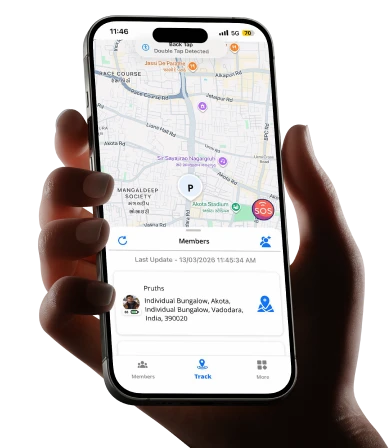
You’re at work. Your teenager should be home by 4 PM. It’s 5:30 PM and your calls are going unanswered. That knot in your stomach? Every parent knows it. A good family tracking app doesn’t just show you a dot on a map. It gives you peace of mind, opens up honest conversations with your kids, and keeps your whole family connected, without turning into a surveillance nightmare. Here’s everything you need to know, from how these apps work to whether you should actually use one. What Is a Family Locator App? A family locator app is a mobile application that lets family members share their real-time location with each other. Think of it as a private, family-only map where everyone can see where everyone else is, as long as they’ve agreed to share. It’s not just for tracking kids. Parents can share their location too. Grandparents can stay connected. It works both ways. Most apps also come with extras like check-in alerts, driving speed reports, and notifications when a family member arrives at or leaves a specific place, like school, home, or a friend’s house. How Does a Family Tracker App Work? It’s simpler than you think. Here’s the basic flow: You download the app and create a family group. Each family member installs the app and joins the group. Everyone’s location is shared in real time on a shared map. You set up alerts for specific places (called geofences). The app notifies you when someone arrives or leaves those places. The app runs quietly in the background using your phone’s GPS. It doesn’t drain battery the way older apps used to. Most modern location tracking apps for family are built to be lightweight and low-impact. Pro Tip: Set up geofences for your child’s school, your home, and any after-school activity locations. You’ll get automatic alerts without having to constantly check the app. This reduces anxiety and gives your child space. Can You Track Family Members on iPhone? Yes, absolutely. Apple has a built-in feature called Find My, which lets you share locations with family members through Wings Track. It’s free and works well for basic use. But here’s the honest truth: built-in tools are often limited. They don’t offer driving reports, crash detection, SOS alerts, or the kind of communication features that a dedicated location tracking app for family provides. If you want more than just a location pin, a dedicated family tracking app gives you a fuller picture. What Does a Family Locator App Actually Do? Let’s break it down practically. Here’s what a solid app covers: Feature What It Does for Your Family Real-time location sharing See where everyone is, right now Geofence alerts Get notified when kids arrive or leave specific places Driving reports Know if your teen is speeding SOS / panic button Family members can send an instant alert if they feel unsafe Check-in messages Quick “I’m here” updates without a full phone call Location history See where someone was earlier in the day These features aren’t about control. They’re about connection and safety. When your child knows you can see their location, it actually encourages more open conversations about where they’re going and why. Should Parents Track Their Child? This is the question most parents wrestle with. And the honest answer is it depends on how you do it. Here’s what research and real-world experience consistently show. When parents involve their children in the decision, explain why the app is being used, and make location sharing mutual, kids feel more secure, not monitored. Tracking without conversation = surveillance. Tracking with conversation = safety and trust . A Real-World Example Sarah, a mother of two in Chicago, started using a family tracking app when her 13-year-old began taking the bus to school alone. Instead of secretly installing the app, she sat down with her daughter, showed her how it worked, and explained that she’d be sharing her own location too. Her daughter’s response? “That’s actually kind of cool, Mom.” Six months later, the app helped Sarah locate her daughter quickly when her phone died during a school trip. No panic. No worst-case scenarios. Just a quick check and a sigh of relief. Parenting Checklist: Is Your Family Ready for a Tracking App? Have you talked with your child about why you want to use it? Will you share your own location too, making it mutual? Have you agreed on boundaries, like not checking every five minutes? Does your child know they can talk to you if they feel uncomfortable? Have you set up the app together as a family activity? Are you using it as a safety tool, not a punishment tool? If you can check all six, you’re approaching this the right way. FAQ What is a family locator app? A family locator app is a mobile tool that lets family members share their real-time GPS location with each other in a secure way. It often includes features like arrival alerts, geofencing, and SOS buttons. It’s designed to keep families connected and safe, not to spy on each other. How does a family tracker app work? Each family member downloads the app and joins a shared group. The app uses your phone’s GPS to show everyone’s location on a private map. You can set alerts for specific locations, review location history, and send check-ins. It runs quietly in the background and updates in real time. Can you track family members on an iPhone? Yes. Apple supports family location-sharing apps available in the market. However, dedicated family tracking apps offer more features, including driving behavior reports, geofence notifications, SOS alerts, and cross-platform support for families with both iPhone and Android users. What does a family locator app do beyond showing location? Beyond real-time location, most apps offer geofence alerts, driving speed monitoring, crash detection, SOS panic buttons, and location history. Some apps also include family messaging features, making it easier to stay in touch without switching between multiple apps. Should I tell

Free parenting app
Child Locator App

How Parenting App Help Modern Families Stay Connected

Not every parenting app does the same thing. Here’s what they actually are, what each category genuinely handles, and how to figure out which type your family actually needs. The Drawer Full of Downloaded Apps That Nobody Uses A mother of two downloads a parenting app after reading about it in a Facebook group. She sets it up on a Saturday afternoon, configures a few settings, and fully intends to use it starting Monday. By Wednesday, it’s still technically installed. By the following weekend, she’s forgotten it exists. This scenario is so common it has become a cliché of modern parenting. The app market aimed at parents has exploded over the past decade, with thousands of tools claiming to make parenting easier, safer, more connected, or more organized. Most families have tried at least one. Far fewer are still using one six months later. The reason isn’t that the apps don’t work. It’s that most parents download a parenting app without a clear answer to a question that should come first:  What specific problem is trying to solve? A parenting app is not a single category of tool any more than “medicine” is a single category of treatment. The phrase covers everything from location sharing to screen time management to developmental milestone trackers to co-parenting coordination tools. These are fundamentally different solutions to fundamentally different problems. Downloading the wrong one, even a well-built, highly rated one, produces a drawer full of unused apps because the tool and the problem never matched. This guide clarifies what parenting apps are actually used for, what each category genuinely delivers, which families benefit most from each type, and how to approach the selection decision in a way that results in a tool your family will actually use. 5 Distinct Categories of Parenting Apps Understanding that “parenting app” is an umbrella term covering five different tool categories is the single most useful reframe for any parent navigating this space. 1) Family Location and Safety Apps These apps exist to answer one question: where are the people I love, right now? They share real-time GPS location within a defined family group, send alerts when family members arrive at or depart from saved locations, and maintain ambient awareness of whether children, elderly relatives, or traveling partners are where they’re supposed to be. The daily use case is specific and consistent: a parent who wants to know their child left school, a spouse tracking a partner’s long commute on a bad weather night, a family managing a teenager’s first weeks of driving independence, or an adult child who wants to confirm an elderly parent got home safely from a medical appointment. What they don’t do: manage what happens on a device, filter content, or address anything about a child’s digital life. They track physical location. That’s it. When that’s the problem of physical safety, location anxiety, and distance management, they solve it well. Wings Track sits in this category. It’s built specifically around family location sharing as the primary function, with genuine cross-platform compatibility across iOS and Android, real-time updates, and arrival and departure alerts that replace the cycle of anxious check-in texts that interrupt everyone’s day. The core features are accessible without mandatory payment, which matters for families who want to confirm a tool works before committing financially. 2) Parental Control and Screen Time Management Apps These apps manage what happens on a child’s device, not where the device physically is, but what the child does with it. The functions covered: daily screen time limits that automatically lock the device when the limit is reached, content filtering that blocks specific categories of websites and apps, approval requirements for new app downloads, safe search enforcement across browsers and search engines, communication limits that restrict who a child can contact during specific hours, and downtime scheduling that makes the phone unavailable during school hours or bedtime. The families who need this category most are those with younger children who have smartphones or tablets and no structured limits on how those devices are used. The research on children’s sleep, attention, and mental health and their relationship to unmanaged smartphone use is consistent and concerning enough that this category of app addresses a genuine, documented need rather than a parental anxiety without substance. Google Family Link (free, Android-focused) and Apple Screen Time (free, iOS-only) are the built-in options that handle this category competently for most families without requiring a third-party subscription. Qustodio and Bark handle it more comprehensively across multiple platforms for families whose needs exceed what the built-in tools provide, at a cost. What these apps don’t do: track where a child physically is. A screen time manager tells you what your child is doing on their device. It tells you nothing about where the device and the child carrying it actually are. 3) Child Development and Milestone Tracking Apps These are the apps designed for parents of infants, toddlers, and young children who want to track developmental milestones, feeding schedules, sleep patterns, growth measurements, and health records. The use case is specific to the early childhood period. A new parent tracking nursing sessions and sleep intervals. Parents monitor whether their toddler is hitting developmental milestones within typical ranges. Families maintain organized health records for pediatric appointments. Multiple caregivers, parents, grandparents, and nannies are coordinating a child’s daily schedule through a shared platform. Apps in this category include Huckleberry (sleep tracking and scheduling), Baby Connect (comprehensive daily activity logging), and The Wonder Weeks (developmental milestone guidance based on research). They serve a clearly defined need for a clearly defined period of parenting. What they don’t do: any of the functions in the other four categories. They’re early childhood tools that become irrelevant as children grow, which is a feature rather than a limitation. The problem they solve is age-specific. 4) Co-Parenting Coordination Apps These apps are designed for separated or divorced parents who share custody and need to coordinate parenting responsibilities, communicate about their children, and manage shared schedules

location tracking
Child Locator App

Does Location Tracking Work Internationally?

For the parent whose child just landed in another country and whose phone has gone suspiciously quiet. The Longest Silence When A mother in Mumbai checks her phone for the fourteenth time in an hour. Her son landed in Manchester six hours ago for his first year of university. He sent a voice note from the airport. That was the last message. It’s now 11:47 PM India time, which means it’s 7:17 PM in the UK. He should be at his student accommodation. He should have texted. He hasn’t. She isn’t panicking. She’s doing something quieter, sitting with the specific helplessness of loving someone who is now seven time zones and a nine-hour flight away, with no reliable way to confirm they’re safe without waking them up with a worried call that will embarrass them in front of their new flatmates. This situation plays out across millions of households globally every single day. Not just parents and children. Spouses where one partner works abroad. Families with elderly parents traveling internationally. Business travelers whose families want the basic reassurance of knowing they landed safely. Workers in the Gulf whose families back in Kerala or Punjab want to see a location dot moving rather than waiting anxiously for a WhatsApp message that might come hours late. The question these families are all really asking is the same one: Does location tracking actually work when the people you love cross a border? The answer is yes, with conditions that are worth understanding clearly before you depend on any tool for this purpose. This guide covers everything: how international location tracking works technically, which apps handle it reliably, where the gaps are, and how to set up a system your family will actually use across distances that make normal communication complicated. How International Location Tracking Works: The Technical Reality in Plain Language Location tracking in any app depends on three data sources working together: GPS satellites, cellular network towers, and Wi-Fi positioning. GPS satellites are global. They cover every point on Earth without exception, and they don’t care which country a device is in. A phone in London, Lagos, or Lahore receives the same GPS signal quality as one in the same city where the tracking app was downloaded. This is the foundation that makes international location tracking theoretically possible everywhere. The practical complications come from the other two layers. Cellular network positioning requires the device to have an active SIM connection, either a local SIM, an international roaming plan, or an eSIM. When a family member travels internationally and switches to a local SIM or activates roaming, the app continues to function as long as data connectivity exists. When they land and turn on airplane mode to avoid roaming charges, or when they’re in a coverage gap, the location stops updating. The app shows the last known position with a timestamp, which is better than nothing but not the same as real-time awareness. Wi-Fi positioning is what fills the gaps. When a device is connected to Wi-Fi at a hotel, a university campus, a workplace, or a home location, accuracy can be maintained even without cellular data. This matters enormously for families managing international distance, because it means location sharing often works well precisely when family members are in the places that matter most: their accommodation, their workplace, their daily destinations. The practical implication: international location tracking works reliably when a family member has either active cellular data or a Wi-Fi connection. It pauses in transit on flights, in coverage dead zones, and during SIM switches. Understanding this rhythm prevents the misinterpretation of a paused location update as something concerning. Does Life360 Work Internationally, and Is It Actually Free? This is one of the most searched questions from families considering international location sharing, and it deserves a straight answer rather than a redirect to the pricing page. Life360 does function internationally in the sense that the app works across borders; a family circle set up in India continues to display locations whether members are in India or abroad. The GPS and data infrastructure don’t change at the border. The “free” question is where honesty is required. Life360’s free tier has undergone significant restrictions over recent years. Real-time location updates, the feature that makes international tracking genuinely useful rather than decorative, are throttled on the free plan. Location history, which helps families understand movement patterns rather than just a current snapshot, sits behind a paid tier. The driving safety features that make Life360 useful for families with new drivers are almost entirely in premium plans. For a family managing international distance on Life360’s free tier, the experience is often: approximate location available, but not with the update frequency or reliability that makes it genuinely reassuring. Upgrading to a paid plan resolves most of these limitations, but the monthly cost, which ranges from approximately ₹650 to ₹2,400 per month depending on the plan represents a real ongoing expense for families who need this for basic safety awareness rather than premium features. The privacy history is also worth acknowledging. Documented reporting has confirmed that Life360 previously sold user location data to third-party data brokers. Policy changes have followed, but for families sharing sensitive international movement data, which can reveal employment locations, accommodation addresses, and daily routines abroad, this history warrants careful reading of the current privacy policy before committing. Is Wings Track Better Than Life360 for International Families? The honest answer is: for families whose primary need is reliable international location sharing without mandatory payment, Wings Track is the better choice for them. The distinction isn’t about which app has more features overall. It’s about which one is built around the actual use case of families managing distance across borders. Wings Track’s core location sharing real-time GPS, family circle visibility, arrival and departure alerts functions across international boundaries without the feature throttling that characterizes Life360’s free tier. A family circle that includes a parent in India, a student in the UK, and a sibling in

Scroll to Top