Because “free parental control apps” in the world rarely mean what parents hope it means, and sorting the genuine from the misleading takes longer than most families have.
The Search That Starts at 10 PM
A father opens the app store. His eleven-year-old has just discovered a corner of YouTube he wasn’t supposed to find, and the discovery happened because the family had no filter in place, just hope and the assumption that the default settings on a new phone were enough.
They weren’t.
So now he’s searching “free parental control app” at 10 PM, scrolling through results that all look identical, reading descriptions that all promise everything, and trying to figure out which one will actually work without requiring a credit card number before he’s confirmed it does anything useful.
This experience is nearly universal among parents who’ve reached the point of looking. The problem isn’t that the tools don’t exist. The problem is that “free” is the most abused word in the parental control app market and navigating what it actually means for each app requires more research than most parents have time or patience for at 10 PM on a school night.
This article does that research for you. It covers the apps that are genuinely free at a functional level, the ones that use free as a marketing entry point for a paid product, and the specific situations each tool handles best. No sponsored rankings. No affiliate disclaimers hidden in fine print. Just the honest picture of what’s available without cost and what that actually delivers for your family.
What “Free” Should Mean And What It Usually Means Instead
Before evaluating specific apps, establish a standard.
A genuinely free parental control app delivers its core safety function without payment. The features that address the reason you downloaded the content filtering, screen time limits, location sharing, app management work without a subscription. Optional premium tiers might add convenience, advanced reporting, or additional devices, but the basic protective function is accessible to any family regardless of budget.
This standard is met by fewer apps than the market suggests.
The more common model: the app is free to download, functional enough during a trial period to convince you it’s worth keeping, and then progressively restrictive as the free tier quietly shrinks. Content filtering works until you realize it only covers the default browser and not the three other ways your child accesses the internet. Screen time limits work for one device. The app is technically free for 7 days, after which the features you actually used during evaluation require a monthly payment.
Identifying which category an app falls into requires testing it against your family’s real daily usage for at least a week before concluding anything about its value. The apps that hold up under that test are the ones worth recommending.
Wings Track: Free Location Sharing That Fills the Gap Both Built-In Tools Leave
Google Family Link doesn’t cover iPhones. Apple Screen Time doesn’t cover Android devices. Neither provides the cross-platform family circle experience that mixed-device households which is most households actually need for location sharing.
Wings Track fills this gap as a genuinely functional free option for family location sharing across both platforms.
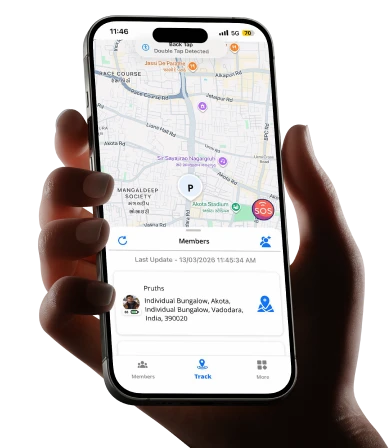
A family with a mother on iPhone, a father on a company Android, and two children on different device brands can create a single Wings Track family circle where all four members are visible to each other simultaneously. The location accuracy, update frequency, and alert functionality is equivalent regardless of which device each person carries. This is not a feature claim, it’s the baseline design requirement the app was built around, because mixed-device families are the norm rather than the exception.
What the free tier includes:
Real-time location sharing within a family circle. Arrival and departure alerts for saved locations home, school, workplace, regular activity locations. Family circle management for multiple members. Cross-platform visibility between iOS and Android users. These features function without payment because they represent the core safety use case the app is built to serve.
Where Wings Track sits in the parental control picture:
Wings Track is a location safety tool, not a content filtering or screen time management tool. It answers “where is my child?” not “what is my child doing on their device?” For complete parental oversight both physical location awareness and digital content management Wings Track works alongside Family Link or Screen Time rather than replacing either.
The combination of Family Link (for Android device management) plus Wings Track (for family location sharing) covers both dimensions of child safety for Android-primary families without any mandatory subscription cost.
Best for: Families who need cross-platform location sharing, particularly households with mixed iOS and Android devices. Essential for families where the built-in location tools of either ecosystem can’t cover all family members.
Google Family Link: The Most Genuinely Free Starting Point for Android
A parent sets up Family Link on their child’s Android phone in under fifteen minutes. From that point: every app their child tries to download triggers an approval request on the parent’s phone. Daily screen time limits lock the device automatically when the limit is reached. Location updates continuously on the parent’s dashboard. The child’s Google account is managed through the parent’s, meaning search results apply SafeSearch and YouTube applies restricted mode.
All of this costs nothing. Not a trial. Not a freemium tier. Nothing.
Google Family Link is the most honest free parental control option in the Android market because it delivers its core function: app management, screen time limits, content filtering at the Google account level, and location sharing without restriction or payment. Google’s business model doesn’t depend on monetizing Family Link users because the value to Google is in maintaining family relationships within the Android and Google ecosystem, not in subscription revenue from parents.
What it handles well:
App approval before installation is Family Link’s strongest feature. Nothing reaches a child’s device from the Play Store without explicit parental sign-off. For families where the concern is children downloading games, social apps, or content they shouldn’t have, this single feature addresses the problem more directly than any content filter applied after installation.
Screen time limits work across the device rather than per-app, which means a child who has used their daily limit can’t simply switch from the restricted app to a different one. The device locks. This is more effective than per-app limits that create a whack-a-mole dynamic where children shift between apps to extend their screen time.
Location sharing is continuous, accurate, and free. For families who need basic child location awareness alongside device management, Family Link provides both without requiring two separate apps.
What it doesn’t handle:
Family Link’s content filtering at the browser level is functional but not granular. It enforces SafeSearch and YouTube restricted mode, which catches the obvious categories. It doesn’t provide the detailed category-by-category filtering that third-party tools offer blocking specific content types while allowing others within the same platform.
The age cliff is a significant limitation. Family Link’s management structure automatically changes when a child turns 13, transitioning to a permission-based model where the child can approve or reject parental oversight features. Many families discover this transition unexpectedly, at exactly the developmental stage where digital safety concerns tend to increase rather than decrease.
Family Link manages Android devices. iPhone users in the family receive no coverage.
Best for: Families with children under 13 using Android devices who need app approval, basic content filtering, screen time limits, and location sharing as a package — all without cost.

Apple Screen Time: Free, Powerful, and Entirely Within the Apple Wall
Every iPhone comes with Screen Time built in. No download. No account. No subscription. The setup takes about eight minutes if you know where the settings are.
Screen Time handles more than most parents realize before they’ve explored it fully.
Communication limits restrict who a child can call or message during specified hours — including during school hours and after bedtime. This feature is specific enough to be genuinely useful: you can allow contact with saved family members during downtime hours while blocking communication with contacts outside that list. For parents concerned about who their child is talking to at midnight, this addresses the concern directly.
Downtime scheduling locks non-essential apps during defined hours. School hours, dinner hours, bedtime the phone doesn’t stop working entirely but becomes limited to apps the parent has specifically allowed. The consistency of this feature across iOS versions makes it more reliable than many parents expect from a built-in tool.
Content and privacy restrictions apply at the operating system level rather than the browser level. This means restrictions don’t depend on the child using a specific browser they apply across the device regardless of how content is accessed.
The hard ceiling:
Screen Time is Apple only. An Android device in a child’s hands receives zero coverage from Screen Time, regardless of how comprehensively a parent has configured it on their own iPhone.
The management experience for parents using Android phones themselves is limited. While Screen Time settings can be applied to a child’s iPhone from another iOS device, parents on Android managing a child’s iPhone face a more complicated experience than the seamless family sharing Apple’s marketing implies.
Screen Time has no location sharing. It manages what happens on the device but provides no awareness of where the device and the child carrying it physically is. Families who need both device management and location awareness need to add a second tool.
Best for: All-Apple households where children use iPhones, particularly for content restrictions, communication limits, and screen time scheduling. Needs to be paired with a location tool for complete coverage.
Bark: Free Tier With a Specific and Honest Purpose
Bark operates differently from every other app on this list. Rather than giving parents a dashboard where they can read through their child’s messages and activity, Bark uses automated monitoring to flag specific content categories self-harm, bullying, explicit content, depression indicators and alerts parents only when something concerning appears.
The philosophy behind this design is worth understanding: Bark was built on the premise that reading through a teenager’s private messages creates trust damage that outweighs the safety benefit, but that parents genuinely need to know when something serious is happening in those messages. Automated flagging with parental notification is the middle position between full surveillance and complete ignorance.
The free tier covers basic web filtering and screen time management. The monitoring features that Bark is best known for in social media and messaging analysis require a paid subscription, currently around $14 per month for the family plan.
Honest assessment of the free tier: It’s functional for basic filtering and scheduling. If Bark’s monitoring philosophy matches your family’s approach to privacy and teenage trust, the paid tier is what makes it genuinely valuable. The free tier alone doesn’t differentiate it from Family Link or Screen Time.
Best for: Parents of teenagers who want automated flagging of serious concerns without reading through all private communications. The free tier is a reasonable starting point; the paid tier is where its distinctive value lives.
Qustodio’s Free Tier: Evaluate, Then Decide
Qustodio is one of the most comprehensive parental control tools available. The free tier covers one device with basic features enough to evaluate whether the interface, filtering quality, and reporting style work for your family before committing to the paid plan.
The paid plan, which covers five devices and includes the social media monitoring, location tracking, and detailed reporting that make Qustodio genuinely comprehensive, costs approximately ₹4,500–5,500 per year for Indian users or around $55–70 per year in USD markets.
The free tier is not a long-term solution for families who need coverage across multiple children’s devices. It is an honest trial period for a paid product which Qustodio is transparent about rather than obscuring behind misleading “free” positioning.
Honest assessment: If your family needs cross-platform comprehensive parental controls and you have the budget, Qustodio’s paid tier is one of the strongest options in the market. The free tier exists to let you confirm it works for your family before paying. Treat it as such.
The Combination That Covers Most Families for Free
For families who want genuine coverage without any subscription cost:
Android children: Google Family Link for app approval, content filtering, screen time limits, and basic location sharing. Free, reliable, no paywalls.
iPhone children: Apple Screen Time for content restrictions, communication limits, and screen time scheduling. Free, native, deeply integrated.
Location sharing across all family members regardless of device
Wings Track for the cross-platform family circle that neither built-in ecosystem provides for mixed-device households. Free core features, accurate, international-capable.
This three-tool combination of two built-in OS tools and one dedicated location app covers both digital safety and physical location awareness for most family configurations without requiring a single monthly payment.
The gaps this combination doesn’t cover: detailed social media monitoring, automated content flagging in messaging apps, and the kind of comprehensive reporting that paid tools like Qustodio and Bark’s premium tier provide. For families where these specific concerns are significant particularly families of teenagers navigating active social media lives a paid tool becomes worth evaluating seriously. For families whose primary needs are app management, screen time limits, content filtering, and location awareness, the free combination handles the job.
The Question That Determines Everything
Before downloading anything free or paid answer this one question specifically:
What exact situation we trying to prevent or address?
- My young child is accessing content they shouldn’t be filtering and app approval (Family Link, Screen Time).
- I don’t know where my child is during the school day location sharing (Wings Track, Family Link).
- My teenager is on social media at midnight when they should be asleep screen time scheduling and communication limits (Screen Time, Family Link).
- I’m worried about who my child is talking to online communication monitoring (Bark paid tier, Qustodio paid tier).
- My family is spread across different cities and I need everyone’s location visible cross-platform location sharing (Wings Track).
The free tools in this guide cover the first three situations comprehensively. The paid tools become relevant primarily for the fourth situation, which requires the kind of communication monitoring that free tiers don’t sustainably offer.
Knowing which situation you’re in determines which tool belongs on your phone and prevents the frustration of downloading something for free, discovering it doesn’t address your actual concern, and concluding incorrectly that nothing works.
Something works. The question is matching the right tool to the right problem.
Final Thought: Free Is Enough for Most Families
The parental control app market wants you to believe that comprehensive child safety requires a monthly subscription. For most families, it doesn’t.
Google Family Link, Apple Screen Time, and Wings Track all free at their core functional level cover the daily safety needs of the majority of families with children navigating smartphones and independent movement.
The paid tools earn their cost in specific situations: active social media monitoring for teenagers, detailed usage reporting across multiple children, or the kind of automated flagging that requires significant ongoing infrastructure to maintain.
Know your situation. Test the free options first. Pay only when a specific gap in the free tools creates a real, daily problem for your family’s safety. That’s the honest version of the parental control app market in 2025. Everything else is marketing.
Start with what’s free. Add what’s necessary. Skip everything in between.