family tracking app

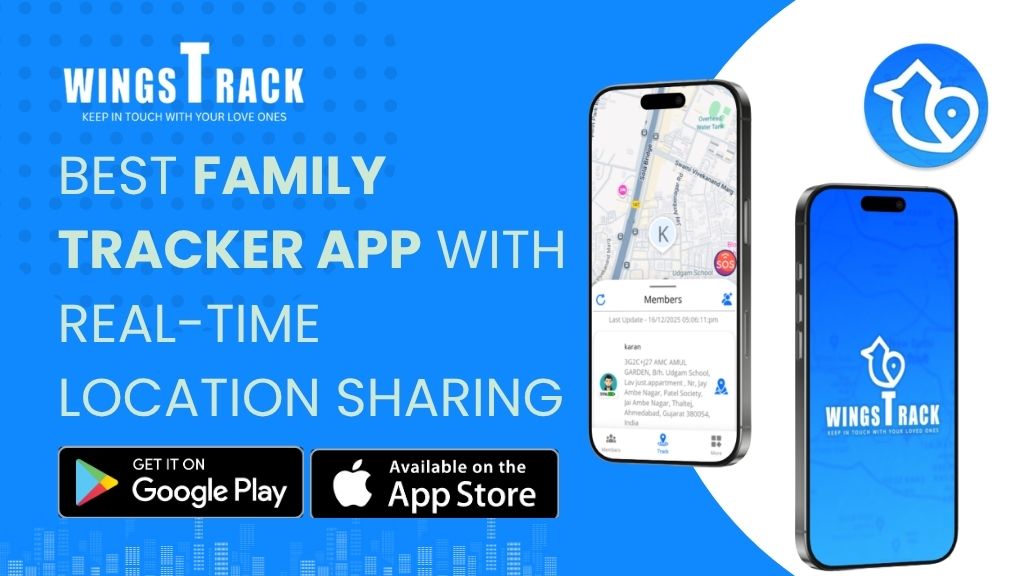
Best Family Tracker App With Real-Time Location Sharing
Child Locator App

Best Family Tracker App With Real-Time Location Sharing

Because knowing where your family is shouldn’t require a phone call, a prayer, and twenty minutes of ceiling-staring at midnight. The Quiet Cost of Not Knowing Here is a situation that requires no imagination for most parents reading this. It is 7:48 PM. Your teenager was supposed to be home at 7:00. You have sent three texts. Two have been read. None have been answered. Your spouse is asking you from the other room whether you’ve heard anything. You say “not yet” in a voice that sounds calmer than you feel, because one of you has to appear composed, and tonight that job has fallen to you. You are not panicking. You are doing something quieter and more exhausting than panic — you are managing uncertainty with no information, no tools, and nothing to do except wait and try to keep your imagination from running the scenarios it wants to run. Now consider a different version of that same evening. Your teenager is out. It’s 7:48 PM. You glance at your phone, see their location dot moving down a familiar street four minutes from home, and go back to whatever you were doing. They walk in at 7:52. Nobody’s stress levels have been elevated. Nobody had to text anyone. Nothing interrupted anyone’s evening. Same teenager. Same situation. Completely different experience — for everyone. That difference is what a well-built family tracker app with real-time location sharing actually provides. Not control. Not surveillance. The specific, targeted replacement of uncertainty with information, in the moments when that information matters most. This guide covers everything a family needs to understand before choosing a location sharing tool in 2025: what these apps actually are, how to use them practically, whether they work across iPhone and Android, whether they cost money, and why Wings Track has earned genuine loyalty from families who’ve tested the alternatives and stopped looking. What Is a Family Life Tracker App — And Why Does It Actually Matter? A family life tracker app is a mobile application that allows members of a defined family group to share their real-time GPS location with each other, receive alerts when members arrive at or depart from specific locations, and maintain continuous awareness of where everyone is without requiring active communication. That definition sounds clinical. The reality is deeply human. Think about the number of times in a typical week that a family exchanges location-related communication: “Did you leave yet?” “Are you almost home?” “Did she get to school okay?” “What time does his practice end?” “Can you check if Dad’s on his way?” These are not meaningful conversations. They are anxiety-management transactions — small, repetitive interruptions to everyone’s day that exist purely because the information isn’t otherwise available. A functioning family location tool eliminates most of these transactions entirely. The information is simply there, ambient and accessible, without anyone having to ask or answer. Parents working in other cities can see their children arrived home from school. Spouses with long commutes don’t have to field “where are you” texts while driving. Families with members spread across multiple countries maintain a thread of daily awareness that no amount of scheduled phone calls fully replicates. The importance of this technology in 2025 goes beyond convenience. Family structures have changed. More parents work remotely in cities far from their families. More children navigate daily life with independence at younger ages. More elderly family members live alone and need occasional welfare checks without the intrusion of constant calling. The family locator app category exists because genuine family life has outgrown the communication tools that used to be sufficient for it. Wings Track was built with this understanding at its foundation. Not as a corporate product retrofitted for family use, but as a tool designed specifically around the emotional and practical reality of families who are spread out, busy, and trying to stay connected without making connectivity itself a burden. GPS Tracker Family Locator App – How to Use It: A Simple Step-by-Step Guide One of the most common reasons families hesitate on location-sharing apps is the assumption that setup will be complicated. It isn’t — at least not with tools built for general family use rather than enterprise applications. Here is the practical setup process for Wings Track, which mirrors the approach of most well-designed family location apps: Download and create your account. Open the app store on your device — App Store for iPhone, Google Play for Android — and search for Wings Track. Download is free. Account creation requires an email address or phone number and takes under two minutes. Create your family circle. Once your account is active, create a new circle and give it a name — typically your family name. This circle is the shared space where all family members’ locations are visible to each other. Invite family members. The app generates an invitation link or code that you send to each family member. They download the app on their own device, enter the code or tap the link, and they’re added to the circle. This works regardless of whether they’re using iPhone or Android. Set up important locations. Add the addresses that generate the most anxiety-related communication in your household: home, school, workplace, after-school activity locations, grandparents’ house. For each location, configure arrival and departure alerts — who receives notifications and under what conditions. Let the app run. This is the step that distinguishes a genuinely well-engineered tool from a poorly built one. Good apps run quietly in the background, update location with meaningful frequency, and surface information through targeted notifications rather than requiring constant active checking. If you’re opening the app more than a few times per day to check locations, the notification system isn’t configured correctly for your family’s needs. Total setup time for a family of four: approximately 20 to 30 minutes. Daily active time investment afterward: close to zero. The information comes to you. Can I Track My Son’s Phone Location? The Honest Answer Yes  and the

Family tracking app for android
Family Locator App, Family Tracking App

Best family tracking app free for Android

Why Families Are Looking for Better Safety Tools Every family worries. That is not a weakness. It is my responsibility. Real safety for real families. No noise. Just clarity. Parents worry when children travel to school alone. Working professionals worry when aging parents live in another city. Couples worry when one partner works late or travels daily. These concerns are not dramatic. They are normal. In today’s world, phone calls are often missed, messages go unanswered, and silence creates anxiety. That is why families across India are turning to Android-based location safety tools that help them stay connected without constant checking. A reliable family safety app is not about control. It is about awareness. It helps you know where your loved ones are, whether they reached safely, and whether they need help. When designed correctly, it respects privacy while offering support during real moments of need. How a free Android family tracking app works, which features matter, and why many families are choosing Wings Track as a dependable option. What Makes a Family Tracking App Useful for Android Users Android phones are widely used across India, from students to senior citizens. A good family safety app must work smoothly on different devices, network conditions, and usage patterns. For families, usefulness comes down to five simple questions: A well-built Android family locator answers yes to all of these. What Is the SOS Feature and Why It Matters An SOS feature is the backbone of any serious safety app. In Wings Track, the SOS button is always visible on the map screen. With a single tap, the user sends an emergency alert to connected family members. This alert includes their current location and triggers a loud notification sound on family devices. Why this matters in real life: In these moments, people do not have time to explain. One tap is enough. The SOS feature removes delay and confusion, allowing families to respond faster. What Is Geo-Fencing and How Families Use It Daily Geo-fencing allows you to set virtual safe zones on the map. These can be places like: Once a zone is set, the app sends notifications when the person enters or exits that area. For parents, this brings peace of mind. You do not have to call your child every day asking if they reached school. For working families, it helps confirm that everyone reached home safely. For caregivers, it helps monitor seniors without watching their movement constantly. Geo-fencing works quietly in the background. It informs without interrupting. Live Location Tracking Without Constant Calling Live location tracking shows the real-time position of family members on the map. This is especially helpful for: Instead of repeated calls that may go unanswered, you can simply open the app and see where your family is at that moment. We focuses on accuracy without unnecessary detail. The goal is reassurance, not surveillance. Why Try a Free Family Locator App Before Anything Else Many families hesitate before paying for safety tools. That hesitation is reasonable. A free family tracking app gives you the chance to: We offers core safety features without forcing payment. Families can experience real value first. This approach builds confidence and long-term usage. Free does not mean careless. It means accessible. Is Wings Track Safe for Tracking Family Members Safety is not just about location. It is also about data. Built with family trust in mind. Location sharing happens only with approval. Family members must accept invitations before being connected. No one can track another person without consent. Data is not sold or misused. Location history remains visible only to authorized family members. Users can manage access at any time from the app settings. For families, this balance between safety and respect matters deeply. How a Family Locator App Works in Simple Terms The process is straightforward: There is no technical setup. No hardware. Just phones and trust. Who Should Use a Family Tracking App This kind of app is especially helpful for: It is not about fear. It is about preparedness. Frequently Asked Questions 1. Does a family tracking app work without the internet?Live tracking requires mobile data or Wi-Fi. However, alerts and updates resume automatically once the connection is restored. 2. Will location sharing drain my phone battery?Optimized for Android devices and uses location services efficiently to avoid heavy battery usage. 3. Can children or parents turn off location sharing?Yes. Location access can be managed by the user. Transparency is always maintained. 4. Is it legal to track family members in India?Yes, when tracking is done with consent. it’s requires user approval before any connection. 5. Can I track multiple family members at once?Yes. The app supports multiple profiles, making it suitable for small and large families. Conclusion: Safety That Fits Real Family Life Family safety is not about fear-based decisions. It is about making thoughtful choices that reduce stress and improve communication. A reliable Android family safety solution helps families stay informed, connected, and calm during everyday routines and unexpected moments. Features like SOS alerts, geo-fencing, and live location tracking work best when they are simple and respectful. If you are exploring a free family tracking app that focuses on clarity, consent, and care, it is worth trying. Download the app, invite your family, and see how a small step can bring a quiet sense of relief to your day. Start today. Stay connected. Stay reassured.

Family locator app
Child Locator App, Family Tracking App

Setting Up for Success: 5 Tips for Getting Your Family on Wings Track

Tips for Setting Wings Track Up with Your Family Safety of our families is a major concern to most parents. Although it is normally to show that we love our children, the same best efforts to take care of them are not always welcomed. Most children and adolescents tend to view such products as location transfer tools or family monitors as an infringement of their privacy. There are, however, some useful solutions such as Wings Track which have a number of appealing features to several older children.  As an illustration, adolescents who often receive a ride by their parents can open the app and check how far their mother or father is away to pick them up. Nevertheless, it may be a challenge at the very beginning when you introduce the idea of the implementation of a family locator app for your children and a partner. We have provided some tips which you can use to make sure your conversation with your family is a great success and productive to avoid having a useless talk with your family members. Is Wings Track Right the Right Place To Be? The family tracking service has a number of alternatives. Wings Track can, however, be reputable on providing a reliable location-sharing system with other advantages. As an illustration, in addition to being able to track your family, the Wings Track application also uses Place alerts to enable the notification of a user that someone in your Circle has entered a particular place, e.g. school, work, or even the family home.  5 Ways to Start Your Family with Success at Wings Track. It is necessary to have a plan when you initiate the process of introducing your family to Wings Track. The five tips below will assist in making sure that your kids and partner find a positive experience in the dialogue.  1. Have an Uninhibited Discussion with the Family about the Wings Track One will not be able to mask the fact that the use of an application, such as Wings Track, will enable every member of the entire family to view the whereabouts of other members. But as much as this does not imply that you do not trust your children. Rather, it is significant to speak about how and why a location-sharing app can be useful. 2. Talk About the Good Things about Location Sharing with Your Children Location sharing is not only an advantage to parents but also a good experience among the kids. An example is when a parent is late to collect his or her child in school and does not even respond to their phone calls, the kid can open the application and see where his or her parent is.  3. Determine Expectations Prior to Wings Track installation Establishing the groundwork of the regulations and guidelines of consuming Wings Track is the key to success. It must have clear guidelines on whether one must keep location-sharing turned on or not and what steps to take as an individual in case it is switched off at some time. You as a parent should also be willing to accept the same guidelines so as to facilitate trust between you and your child in using the app.  4. Check the Significant Safety Features Safety becomes the first priority of a family tracking app introduction to the majority of the members. One needs to have a free talk with your family and assure them that you are seeking a location-sharing application in order to keep everybody safe, but not to monitor them.  5. Provide a chance to everyone to express himself or herself Naturally, some resistance will be registered among the children upon hearing about the location-sharing option. Nevertheless, it is necessary to listen to their worries and talk about what can be done to reduce their reluctance. Finally, when speaking about the ways Wings Track can make the family safer, you should make the family realize why you are introducing the family to this app. In case you still have some problems getting buy-in by all the family members, you can consider allowing them to help come up with the rules. They can be made to feel more engaged by enabling them to make decisions on how the family will use the app.  With Wings Track, Keep Your Family Safe Sometimes we cannot be with our children every hour of the day, however, with such a solution as Wings Track, one can enhance their safety even when they are away. Get the Wings Track app and witness the power of the app to save your family.

location-history-wings-track
Family Locator App, Family Tracking App

How to See Someone Else’s Location History

View History of Whereabouts in another Person. The desire of people to know their own and others location history has increased in a world where travel and technology are the order of the day. As the parents monitor the whereabouts of their children, to pull back the steps in trying to locate something that you have misplaced, location history can be tremendously effective.  Is it possible to track Location History? No, it is possible to track location history on both iPhone and Android. When it comes to the case of Wings Track, the user would be required to approve the knowledge of giving their position to the rest of their Circle. What Is ‘Location History’? Location history is the term used in reference to the storage and collection of location information through a duration of time. It is in a way a digital map of the places a person has visited. Although this might seem like a sci-fi film idea, the fact is that this attribute improves our process of interacting with others and making our life management. Viewing the Location History of another person. Mindfulness of where your beloved has been, or where you have been can be put into good use. With that said, one should treat it with the attitude of trust, care, and concern. This is a tutorial on the procedure to view the location history of someone on Wings Track on both iOS and Android. 1. Begin with Open Communication. One should first communicate with someone before resorting to the assistance of technology to determine where the individual has been. Regardless of whether you are a parent, a partner or a friend, a kind of honest conversation about intent creates trust and understanding. It is always best to simply ask and have trust in your beloved one depending on your own will. 2. Use Wings Track Wings Track will give you the ability to view the location history of users in your Circle with their location sharing preferences of the always-on option. This implies that you will not be able to view their entire location history in case they switch their location sharing periodically. Using the free Wings Track plan, the user will be able to view a maximum of 7 days of location history.  In order to obtain this information, you will just have to click on the icon history to the right hand side of the member name that you want to access the past history information. Filter our features to select the date and time to display precise location history information of time spent there. Here you will find a list of trips and places at the given time. 3. Leverage Positive Intent In trying to find the history of location of another person, work with positive intentions by using it. In the case of parents, it may be the question of making sure that their children are safe or not knowing how to make them lie. Friends may be interested in assisting their friends to follow their steps in order to recover something that they might have lost on the way. In case a loved one has been lost then Wings Track would be in a position to trace them down to a point where they might have been last. The good intentions towards location history tracking will contribute to the establishment of trust among friends and family members. 4. Stay on the Map of Wings Track  Location history can be an effective thing to do with good intentions and open communication. Although one can find a number of different options to trace the location history of another person, family safety applications, such as Wings Track family – locator app, provide a safe and easy to use platform, in which one can track the whereabouts of their loved ones without feeling guilty about it.

Scroll to Top