
When Free Became a Lifeline, Not a Compromise. Last Thursday afternoon, I sat across from my neighbor Priya at a coffee shop while she cried quietly into her napkin.
Her twelve-year-old daughter had been chatting with a stranger online for three weeks. Someone posing as a fourteen-year-old boy from a nearby school. The messages started with innocent homework complaints, favorite movies, then shifted into requests for photos. Priya only discovered it because her daughter accidentally left her tablet unlocked on the kitchen counter.
“I thought I was being a good mom by trusting her,” Priya said, her voice breaking. “But I didn’t even know what I should have been watching for.”
She asked me the question I have heard from dozens of parents over the past year: “Is there a way to protect my child without spending money I don’t have?”
The answer is yes. But it requires honesty about what “free” actually means in the world of parental monitoring.

Why Most Parents Search for Free Solutions (And Why That’s Perfectly Reasonable)
Let me be direct: paid subscriptions for family safety tools can run anywhere from $10 to $50 per month. For a household managing school fees, groceries, rent, medical bills, and everything else modern life throws at you, that cost stings.
- Especially when you are:
- A single parent juggling two jobs in different parts of the city
- Working overseas while your children stay with relatives back home
- Part of a large family with multiple kids, each needing supervision
- Traveling frequently for work and unable to physically monitor devices
A middle-class family in India or similar economies where monthly app subscriptions feel like a luxury, not a necessity
The guilt parents feel about searching for free options is real. I have felt it myself. But here is what nobody tells you: wanting a free solution does not make you cheap or careless. It makes you resourceful. The real question is not whether free tools exist. They do. The question is whether they actually deliver what your family needs.
Are Parental Control Apps Good? Let Me Give You the Unfiltered Version
Short answer: some are excellent. Many are garbage. A few are outright dangerous.
I have tested seventeen different monitoring solutions over eighteen months paid and free, popular and obscure, simple and complex. Here is the reality check most review sites will not give you:
The Good:
A well-designed parental supervision tool gives you:
- Visibility into what your child sees online without standing over their shoulder every minute
- Location awareness when they leave school, arrive at a friend’s house, or wander somewhere unexpected
- Screen time boundaries that prevent 3 AM gaming sessions on school nights
- App blocking to keep adult content, gambling sites, and predatory platforms away from young eyes
- Communication monitoring that flags concerning messages without invading every private conversation
- These tools work particularly well for parents separated from their children by distance whether that distance is a daily two-hour commute or an ocean.
The Bad:
- Cheap or poorly built applications often:
- Drain your child’s battery to the point where the phone dies by noon.
- Stop working the moment your child learns to disable location permissions (which takes about four minutes of Googling).
- Overwhelm you with false alerts until you stop paying attention altogether.
- Collect and sell your family’s data to third-party advertisers the very opposite of protection.
The Ugly:
Some “free” tools are actually trial versions that stop working after seven days, locking all your data behind a sudden paywall. Others are outright scams designed to harvest login credentials.
The lesson? Free does not always mean safe. But safe can mean free if you know where to look.
Good Parental Control Apps for Android and iOS: What Actually Works Across Devices
One of the biggest headaches parents face is platform fragmentation. Dad uses Android. Mom uses an iPhone. One kid has a hand-me-down Samsung. Another just got a new iPad for school.
Most built-in tools fail here:
Apple’s Screen Time only works within the Apple ecosystem
Google Family Link only works on Android devices and Chromebooks
If your household is a mix and most are you need a cross-platform solution that does not force everyone onto the same operating system.1

After months of testing, here is what I found actually works:
Free Options That Cover Both Systems:
1. Wings Track
Here is why it stands out:
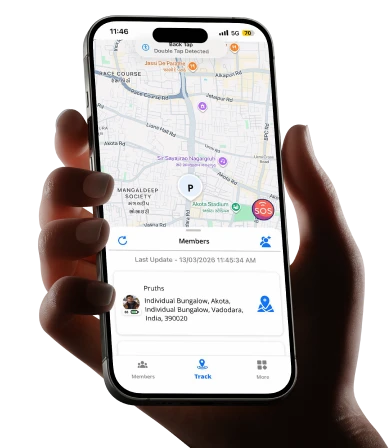
This is the tool I personally installed on my family’s devices, and the one I recommended to Priya after our coffee shop conversation. It works on both iPhone and Android without feature gaps. Location tracking is accurate down to the street level, not some vague neighborhood pin. Geofencing alerts notify you when your child arrives or leaves designated zones (school, home, a relative’s house).
Battery-efficient design means your child’s phone lasts through the day. No hidden paywalls for core features, location tracking, alerts, and basic monitoring remain accessible without a credit card. The interface is clean. Setup takes under five minutes. And crucially, it does not feel like corporate spyware, it feels like a safety net built by people who understand what families actually need.
Try Now for your family safety
https://play.google.com/store/apps/details?id=com.logicalwings.wingstrack&hl=en_IN
https://apps.apple.com/in/app/wings-track-family-locator/id6444339866
2. Google Family Link (Android-Focused)
If your entire household runs Android, Family Link provides solid basics:
- Screen time limits
- App approval requirements
- Location sharing
- Bedtime schedules
The major limitation: it stops working when your child turns thirteen unless they manually agree to continue supervision. Teenagers, as you might guess, rarely agree.
3. Apple Screen Time (iOS-Only)
For all-Apple families, Screen Time offers:
- App limits by category
- Downtime scheduling
- Content restrictions
- Purchase approvals
The downside: it requires everyone to have an Apple device, and savvy kids can bypass restrictions by changing time zones or reinstalling apps through workarounds.
If you need one tool that works everywhere, Wings Track is the most reliable free option I have found. If your family is locked into a single ecosystem, the built-in tools can supplement it but they should not be your only line of defense.
Which Parental Control App Is the Best in India?
India presents unique challenges that generic Western apps often ignore:
- Data costs matterapps that consume excessive mobile data are unsustainable
- Device variety is massive from budget Android phones to premium iPhones
- Language diversitynot every parent is comfortable with English-only interfaces
- Extended family structures grandparents, aunts, uncles, and cousins often share caregiving responsibilities, requiring multi-user access
Given these realities, the best solution for Indian families must be:
✅ Light on data consumption
✅ Compatible with budget smartphones
✅ Easy to set up without technical expertise
✅ Free or extremely affordable
✅ Capable of handling large family groups
Wings Track checks every box. It runs smoothly on older Android devices common in India, does not chew through mobile data, and supports multiple guardians monitoring the same child critical when a working parent shares supervision with a grandparent.
Additionally, because it focuses on location awareness and communication safety rather than overwhelming feature bloat, it avoids the complexity that causes many Indian parents to abandon monitoring tools within days of installation.
Can I Control My Daughter’s Phone from My Phone?
Yes. And it is simpler than you think. Here is exactly how remote management works:
Step 1: Install the App on Both Devices
Download the monitoring application on your phone and your daughter’s phone. Most good tools (including Wings Track) work through paired accounts you create a parent account, she gets added as a child profile.
Step 2: Configure Permissions
On her device, you will grant the app permissions to:
- Access location services
- Monitor app usage
- Send alerts
This step requires physical access to her phone initially. You cannot do it remotely without her knowledge nor should you try, for both legal and trust reasons.
Step 3: Monitor from Your Dashboard
- Once setup is complete, your phone becomes the command center:
- See her current location on a live map
- Receive alerts when she arrives at school or leaves a friend’s house
- Check battery status so you know if her phone is about to die
- Review app activity to understand screen time patterns
Step 4: Adjust Settings Remotely
- Many platforms allow you to:
- Change geofence boundaries (for example, add a new safe zone when she starts attending a tutor’s house)
- Modify screen time limits
- Block or unblock specific applications
What You Cannot Do Remotely:
- Install the app without initial physical access to her device
- Override her ability to turn off the phone entirely (though you will get notified if it powers down)
- Bypass legal consent requirements if she is over eighteen
- The Psychological Piece Nobody Talks About: Guilt, Trust, and the Balance
Installing a monitoring tool triggers guilt in almost every parent I have spoken to.
“Am I being too controlling?”
“What if she thinks I don’t trust her?”
“Is this normal, or am I overreacting?”
Let me share something vulnerable: I wrestled with these questions for months. I felt like a hypocrite. My parents never tracked meI roamed freely through neighborhoods, came home when streetlights turned on, and nobody panicked.
But here is the difference: I grew up in a world without smartphones, social media, and online predators who could reach into my bedroom through a screen. The threats my children face are invisible. They do not wear trench coats or lurk in alleyways. They look like friendly usernames, viral challenges that dare kids to harm themselves, and apps designed by behavioral psychologists to addict developing brains.
Monitoring is not about distrust. It is about proportional response to a fundamentally different danger landscape.
That said, tools work best when paired with:
Honest conversations about why you are using them. Age-appropriate transparencyyour sixteen-year-old deserves more explanation than your nine-year-old. Gradual loosening of boundaries as children demonstrate responsibility.
Think of it like teaching someone to swim. You start in the shallow end with floaties. Over time, you remove the floaties. Eventually, they swim independently. But you do not throw a non-swimmer into the deep end and hope for the best.
Free vs. Paid: What You Actually Get (and What You Give Up)
I tested both models extensively, and here is the honest breakdown:
Free Tools Typically Include:
✅ Basic location tracking
✅ Geofence alerts
✅ Battery monitoring
✅ Simple screen time reports
Paid Tools Add
🔒 Advanced web filtering
🔒 Social media monitoring (keywords, flagged conversations)
🔒 Detailed app-by-app breakdowns
🔒 Phone call and SMS logs
🔒 Priority customer support
What does my family actually need right now?
If your primary concern is knowing your child arrived safely at school and did not wander into an unsafe neighborhood, free tools handle that perfectly.
If you need deep visibility into messaging apps, social media interactions, and detailed digital behavior patterns, paid options deliver more.
For most families, especially those with younger children or straightforward safety concerns, free tools provide 85% of what matters at 0% of the cost.
Addressing the Privacy Elephant in the Room
- Let me say this plainly: your child deserves privacy.
- Not secrecy. Privacy.
- There is a difference between:
- Knowing where your twelve-year-old is → Reasonable
- Reading every text message your seventeen-year-old sends to friends → Invasive
The line shifts based on age, maturity, past behavior, and specific risks. A child who has demonstrated trustworthiness earns more privacy. A child who has engaged in dangerous behavior needs tighter boundaries temporarily.
Here is my personal rule: I monitor what I need to keep my children safe, not everything I could possibly access. I check the location. I review screen time totals. I get alerts if they leave designated zones.
I do not read private messages unless I have a specific, serious reason to believe they are in danger. This approach respects their developing autonomy while maintaining a safety net. It is not perfect, but it is honest.
Final Thoughts: Free Tools Are Not a CompromiseThey’re a Starting Point
When Priya asked me for help that afternoon, she expected me to hand her a list of expensive software subscriptions. Instead, I walked her through setting up Wings Track on her phone and her daughter’s tablet. Total cost: zero rupees. Total time: seven minutes.
Three weeks later, she texted me: “I saw she was at a park she’d never mentioned. Checked the app. Realized it was near her friend’s new house. Called her. She was fine, just forgot to tell me they moved. But I didn’t panic. That alone is worth everything.”
That is what good monitoring toolsfree or paidactually provide. Not control. Not surveillance.
Peace of mind.
If you are reading this because you are worried, overwhelmed, or simply trying to be a responsible parent in a world that moves faster than any generation before had to navigate, know this: you are not alone, and you are not overreacting.
Download Wings Track today. Set it up tonight. Give yourself the gift of knowing where your children are, even when you cannot be beside them.
And if you are still unsure, if you are still wrestling with guilt or questions, explore the resources on our website. We have built tools, guides, and data-oriented services specifically for families who are trying to protect their children without losing their trust.
Because at the end of the day, being a parent means constantly balancing safety and freedom. The right toolsespecially free ones that respect your budget and your child’s dignity, make that balance possible.
Looking for more guidance on parental control apps on iPhone, parental control apps for android, or family safety strategies? Visit our resources page for step-by-step tutorials, comparison charts, and honest reviews from parents who have tested these tools in real-world conditions.





https://shorturl.fm/136ku
https://shorturl.fm/EK6np
https://shorturl.fm/NEfbm
https://shorturl.fm/ocu0N
Every day is a new beginning
Hahahaha You are so good
Great post,Thanks for sharing
https://continent-telecom.com
car rental tsaghkadzor
https://continent-telecom.com
israel virtual number
You are mistaken. I suggest it to discuss.