
What happens if you or someone you love is in a situation where they need emergency assistance but can’t contact 911 or 100, 118 because they are unable to talk on the phone? SOS alerts from Wings Track could help. Of course, you’ll want to have a better understanding of what these alerts are and how to use them.
What Are Wings Track SOS Alerts?
Wings Track SOS alerts send loud beep notification to people you designate contacts in the event of an emergency when you activate the SOS button. This essentially lets your contacts know that something is wrong so they can try to contact you.
Peace of mind starts with location sharing.
Know where they are without asking. See when they get home from school, leave work, or start warming up on the practice field. When you’re all busy doing your thing, Place Alerts keep you in the know. Try Wings Track for free now!
How to Use Free SOS Alerts
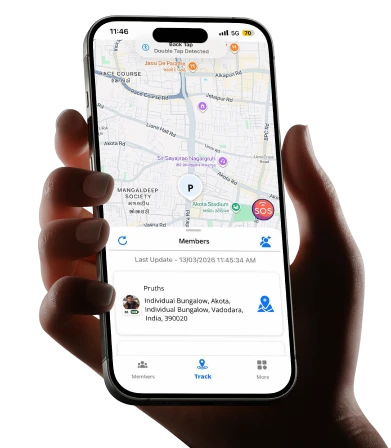
Everyone who is a member of Wings Track in the United States, India, United Kingdom will have access to the free SOS alert feature. You can activate the feature through the main screen of the Wings Track app, where you will see a large button on the right side of the map. To learn more about how SOS can be activated, read here.
How to Use SOS Alerts with 24/7 Emergency Dispatch
While the free SOS alerts can be helpful, you will find that you have a lot more features and your memberships don’t matter. With the SOS and 24/7 emergency dispatch features, the app will also contact dispatch services as soon as the SOS countdown is complete.
All of the Circle members and emergency contacts will be alerted, as well as the dispatch centre. This means that you don’t have to call for help. The dispatcher can then call you to get a better idea of what’s happening. They will then contact the proper authorities to provide help. This might be an ambulance or the police, for example.
How to Cancel Wings Track SOS Alert
Of course, you are probably wondering how to cancel the Wings Track SOS alert if you aren’t in any real danger. It’s easy – all you need to do is just tap on the bell icon on the right side of the member from the app who sent the notification. Notify them 3-Times on the app they need to turn-off notification tap on the bell icons to make sure they are getting your help.
It’s About Peace of Mind
As you can see, Wings Track has a lot to offer, and it’s well worth considering if you want to keep your family safer, as well as your data, your phone, and more. We promise a free family locator app with advanced features to feel they are in safe hands and Zones. Choose one of these best family tracking apps, and rest easy knowing you and everyone in your family are a bit safer no matter where they might be.





Pingback: Download Wings Track Now | Panic Button App For SOS Alerts
Reading this made the practical side much clearer. The cost of getting it wrong early is worth weighing before starting. It makes the next step clearer.
The article notes that with 24/7 emergency dispatch, a dispatcher will call you to understand the situation. But if the user is unable to talk (the exact scenario SOS alerts are meant for), how does the dispatcher proceed? Does the app share GPS location and pre-set medical info automatically?
“`json
{“comment”:”Having a silent SOS feature that automatically loops in emergency dispatch is such a crucial safety tool, especially when someone can’t safely make a phone call. It really offers incredible peace of mind for families.”}
“`
Having a silent SOS option that can alert dispatch automatically is such a crucial safety feature, especially when making a phone call isn’t an option. This definitely gives a lot of peace of mind.
The silent dispatch feature is such an important option for situations where speaking out loud isn’t safe or possible. It really gives extra peace of mind knowing emergency services can be notified even if you can’t place a call yourself.
The silent SOS feature with automatic emergency dispatch is a really smart addition, especially for situations where speaking out loud isn’t safe. Having that extra layer of security and knowing family members can be notified instantly gives a lot of peace of mind.
Since the app transmits precise coordinates directly to emergency dispatchers when the countdown completes, reading the guide on cryptographic verification illustrates why such critical distress payloads need tamper-proof hashing during transit. Knowing that emergency logs and location timestamps cannot be intercepted or altered is just as crucial as the alerts themselves.
As someone who loves color matching, really enjoyed this — very practical advice.
Seeing that large SOS button positioned directly on the right side of the map makes panic activation straightforward, but confirming your designated contacts and countdown timer is what a beginner should check first to avoid unintentional dispatch calls. When I stepped away from updating family device settings, browsing this detailed MapleStory Calculator overview helped me understand character stat optimization just as easily, proving how important clear tool interfaces really are.
The explanation distinguishes the SOS button from an ordinary phone call. Is there a test mode that lets users check the contact list and notification settings without sending a real emergency alert?
Having the app alert designated contacts before 24/7 dispatch services get involved shows why the order of steps matters when managing critical emergencies. In any high-stakes system, whether relying on personal safety workflows or reviewing the Hero Siege Database reference for proper procedural order, getting the sequence right is essential to avoid unintended consequences.
A diagram showing exactly who receives an SOS alert would clarify the service. It would be useful to distinguish a notification to selected contacts from contact with emergency services, and explain how delivery is confirmed.